 For the new MacBook Pro · macOS 27
Your app’s menus,
within finger reach.
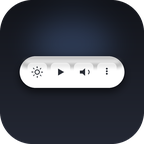
A glass control strip at the bottom of your screen. It follows the front app, presses that app’s own menu commands for you, and never steals focus — so you can tap a key and keep typing. Keep it out of the way, or tuck it into a tiny corner ball.
One-time purchase · 7-day free trial · macOS 27 on Apple silicon · touch on the MacBook Pro with PROLED XDR, mouse or trackpad on any Apple silicon Mac running macOS 27
It follows the app you’re in
Switch apps and the keys switch with you. Tap one and keep typing.
250+ app packs, one bar
Finder, Safari, Chrome, Mail, Notes, Calendar, Music, Photos, Preview, Pages, VS Code, terminal, Office, Adobe and more. The bar knows each app’s real menu commands; 900+ apps have hand-picked keys.
Presses the real menu command
Lidkeys uses the Accessibility API to press the app’s own menu item — not a synthetic shortcut. On our test Macs, the median from mouse-up to the button responding was 2–5 ms, with focus still in the document.
Never steals focus
The bar is a non-activating panel. You can type in the document, reach down, tap Undo, and the next keystroke still lands in your app.
Glass, not a black strip
System glass with real refraction. It follows Reduce Transparency and Reduce Motion, and the labels are designed to stay readable on light wallpapers.
Brightness, volume, media
Press and slide to change brightness or volume. Play/pause and previous/next for whatever is playing — Music, Spotify, browser video and more. Pro adds a media card with ±10 s, speed and multiple sources.
Gets out of the way
Tuck the bar into a tiny corner ball when you want the screen to yourself. Pro adds: hide the Dock until you touch the bottom edge, let windows yield to the bar, tuck it away in full screen, and follow the mouse across screens.
Apps at your fingertips
Swipe through your running apps, tap the Apps button at the left for everything else, and keep four favourites pinned next to ×.
Drop files where they belong
Drop on an app ball to open, hold for the Dock, or drop on × to trash.
Free is useful. Pro is for the heavy lifting.
| What you get | Free | Pro |
|---|---|---|
| Summon / tuck the bar. Never steals focus. | Yes | Yes |
| App-aware keys (250+ app packs · 900+ apps) and auto-generated keys | Yes | Yes |
| Brightness, volume, system keys | Yes | Yes |
| Basic media: play/pause, previous, next | Yes | Yes |
| Choose which screen shows the bar | Yes | Yes |
| Custom keys, five job presets, import/export | — | Yes |
| Media detail card: ±10 s, speed, multiple sources | — | Yes |
| Hide the Dock until you touch the bottom edge | — | Yes |
| Window yield, full-screen tuck, multi-screen follow | — | Yes |
| Unread badge mirroring, emoji while typing | — | Yes |
What Pro adds
Launch offer: $13.99 for the first 100 licenses — the launch discount is applied automatically at checkout. Then $19.99. No subscription. No account. A 7-day full trial before you decide.
1.x updates included; when a new version ships, download it from this page.
Optional: an experimental AI quota pill. It appears on its own only when Strip finds AI coding tools (Claude Code, Codex, OpenCode) on your Mac, and you can turn it off in Settings. See privacy for exactly what it reads.
7-day fully-featured trial first. One-time purchase: $19.99, launch price $13.99 for the first 100 licenses. Secure checkout by Creem, our reseller. Terms · Privacy
Download the free trial
Seven days of everything, including Pro features. No account and no email needed — the trial starts when you first open the app.
Unsigned build notice: this release is not notarized by Apple. On first launch macOS blocks it: click Done (not Move to Trash), then open System Settings → Privacy & Security, scroll down and click Open Anyway. (Right-click → Open no longer works on current macOS.) Or run xattr -dr com.apple.quarantine /Applications/Strip.app. If you require an Apple-notarized build, do not buy yet — release notes.
- macOS 27 (Golden Gate) on Apple silicon. Touch features need the MacBook Pro with PROLED XDR display; on any other supported Mac the bar works with the mouse and trackpad.
- Version 0.3.2 · small download · installs as Strip.app (the name in your menu bar; Lidkeys is the product name on this page).
- No account, no subscription, no analytics. Network: one license check when you activate Pro — see privacy.
- Unsigned build: this release is not notarized by Apple. On first launch macOS blocks it: click Done (not Move to Trash), then open System Settings → Privacy & Security, scroll down and click Open Anyway. (Right-click → Open no longer works on current macOS.) Or run
xattr -dr com.apple.quarantine /Applications/Strip.app. The developer accepts this trade-off explicitly; do not buy if you require an Apple-notarized build.
Works with what you already have
Touch on the MacBook Pro
Built for the bottom edge of the touchscreen MacBook Pro: finger-sized keys and press-and-slide sliders. On a Mac without touch, the identical bar works with the mouse and trackpad.
Privacy, plainly
No telemetry, no analytics, no account. The app makes one kind of network request: validating your license when you activate Pro (and once more if you update from version 0.3.0). The experimental AI quota pill turns on by itself only when Strip finds AI coding tools on your Mac, and you can switch it off in Settings: it reads local usage logs from Claude Code, Codex and OpenCode on your Mac, and nothing from them leaves your Mac. It looks up a DeepSeek balance only if you add your own DeepSeek API key and click Check balance. The event log stays on your Mac and records timing, coordinates and decisions — never window titles or app content.
Honest about permissions
Reading another app’s menus needs Accessibility permission. We explain it once, in plain language, and the bar keeps working without it — minus app-specific keys. Nothing is uploaded.
After you buy
- Checkout is run by Creem, our reseller. Right after payment, our website shows your license key. Copy it and keep it somewhere safe; your Creem receipt has the order ID.
- Install the app, then click the Lidkeys menu bar icon and choose
Activate Pro…. - Paste the license key and press
Activate. Pro unlocks immediately. The key is checked on your Mac, so no internet is needed.
Lost your key, or activation fails? Contact support — we answer and refund within 14 days if it isn’t for you.
Questions
Which Macs does it support?
macOS 27 (Golden Gate) on Apple silicon. Touch features are built for the MacBook Pro with the PROLED XDR display; on any other Apple silicon Mac running macOS 27 the same bar works with the mouse and trackpad (including MacBook Air, Mac mini, Mac Studio and iMac).
Is this an App Store app?
No. The core feature — reading and pressing another app’s menu — is not allowed inside the App Store sandbox. Lidkeys is sold directly from this site. This build is unsigned / not notarized (the developer is not in the Apple Developer Program): on first launch macOS blocks it: click Done (not Move to Trash), then System Settings → Privacy & Security → Open Anyway. Or run xattr -dr com.apple.quarantine /Applications/Strip.app. If you require an Apple-notarized build, do not buy yet. Updates are downloaded from this page (1.x updates are free).
Why does it need Accessibility permission?
To read the front app’s menu and press the item you tapped. It is used only on your Mac and never uploaded. Without it, brightness, volume, media, system keys and app switching still work.
What happens after the 7-day trial?
The app does not disappear. Pro features are tucked away and the free features keep working. Your custom keys stay, read-only. You can buy whenever you’re ready — there’s no timer pressure inside the app.
Do you collect data?
No telemetry, no analytics, no account. The only network request is license validation when you activate Pro. The optional AI quota pill appears on its own only when Strip finds AI coding tools on your Mac (you can turn it off in Settings); it reads local usage logs from Claude Code, Codex and OpenCode without sending them anywhere, and a DeepSeek balance lookup only happens if you add your own DeepSeek API key and click Check balance. The event log stays on your Mac and can be exported redacted.
How do updates work?
1.x updates are free. The app checks by opening this page when you choose “Check for updates…” — it doesn’t run a background updater or download anything by itself. Install the newer version over the old one; your license and settings carry over.
What does the license cover?
One purchase, one person, all the Macs you personally use. No device activation limit, no account. Paste the same key on each Mac.
Refunds?
Yes — email us within 14 days of purchase and we’ll refund it, no questions asked. That’s also our commitment to the early-bird price: if it stops being useful, get your money back.
Is Lidkeys the same app as Strip?
Yes. “Lidkeys” is the product name on this site; the app installs as Strip.app, and that’s the name you’ll see in the menu bar and in System Settings → Privacy & Security → Accessibility.